Astroのサイドバーを多重化する
サイドバーの多重化
公式サイトではサイドバーが多重化(タブ化)している。これと似たような構造を実現する。
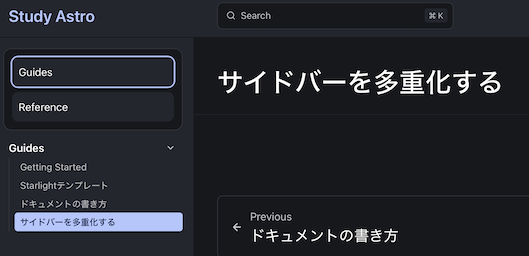
厳密な動作は異なるが、シンプルな実現方法でサイドバーを多重化する。
docs以下のディレクトリ毎に分割する
src/content/docs 以下のトップディレクトリごとに分割する。以下の例では guides と reference 以下のコンテンツがそれぞれ独立したサイドバーで表示されるようにする。
1
2
3
4
5
src/content/docs
├── guides
│   └── example.md
└── reference
    └── example.md
サイドバーの上書き
通常のサイドバーではカスタマイズが難しいため、通常のサイドバーの上部にリンクボタンを設置した、カスタムのサイドバーを用意する。コンポーネントの上書きやカラーテーマのドキュメントを参照する。
GitHub PagesなどでURLにリポジトリ名(BASE_URL)を含む場合は、BASE_URL の処理に注意する。
src/components/Sidebar.astro 1:
1
2
3
4
5
6
7
8
9
10
11
12
13
14
15
16
17
18
19
20
21
22
23
24
25
26
27
28
29
30
31
32
33
34
35
36
37
38
39
40
41
42
43
44
45
46
47
48
49
50
51
52
53
54
55
56
57
58
59
60
61
62
63
64
65
66
67
68
69
70
71
72
73
74
75
76
77
78
79
80
81
82
83
84
85
86
---
import Default from "@astrojs/starlight/components/Sidebar.astro";

// GitHub Pagesの場合はリポジトリ名(BASE_URL)も含める
const links = [
  { label: "Guides", href: "/guides/getting-started/" },
  { label: "Reference", href: "/reference/example/" },
];

const current = Astro.url.pathname;
const isActive = (href) => {
  if (href === "/") {
    return current === "/";
  }

  const group = href.substring(0, href.indexOf('/', 1));
  return current.startsWith(group);

  // BASE_URLがある場合は2要素目がグループ名
  // const group = href.split('/')[2];
  // return current.split('/')[2] === group;
};
---

<nav class="my-sidebar">
  <!-- サイドバー切り替えボタン -->
  <div class="my-fixed-links">
    <div class="my-fixed-links-grid">
      {links.map((item) => (
        <a
          class={`my-fixed-link ${isActive(item.href) ? "active" : ""}`}
          href={item.href}
        >
          {item.label}
        </a>
      ))}
    </div>
  </div>

  <!-- Default Sidebar -->
  <Default><slot /></Default>
</nav>

<style>
  .my-sidebar {
    display: flex;
    flex-direction: column;
    gap: 0.75rem;
  }

  .my-fixed-links {
    padding: 0.75rem;
    border: 1px solid var(--sl-color-gray-5);
    border-radius: 0.75rem;
    background: var(--sl-color-black);
  }

  .my-fixed-links-title {
    font-size: 0.8rem;
    font-weight: 600;
    color: var(--sl-color-gray-2);
    margin-bottom: 0.5rem;
  }

  .my-fixed-links-grid {
    display: grid;
    gap: 0.5rem;
  }

  .my-fixed-link {
    display: block;
    padding: 0.5rem 0.6rem;
    border-radius: 0.6rem;
    text-decoration: none;
    color: var(--sl-color-white);
    background: var(--sl-color-gray-6);
  }

  .my-fixed-link:hover {
    background: var(--sl-color-gray-5);
  }

  .my-fixed-link.active {
    outline: 2px solid var(--sl-color-accent-high);
  }
</style>
作成したサイドバーを使用するように astro.config.mjs に記述する。
astro.config.mjs:
1
2
3
4
5
6
7
8
9
10
11
export default defineConfig({
  integrations: [
    starlight({
      ...
      components: {
        // Override the default Sidebar
        Sidebar: './src/components/Sidebar.astro',
      },
    }),
  ],
});
サイドバーのリンクをフィルタする
リンクボタンは作成できたが、このままではサイドバーには全てのページが表示されているので、これを必要なもののみにフィルタする。
Starlight Examplesに例があるので、基本はそちらから拝借。リファレンスはRoute Dataを参照。
ただし、単純に流用するとGitHub Pagesのリポジトリ名を含むURL(BASE_URL)に対応できない。また、トップページでサイドバーを表示する際にもフィルタが効かないため、少し調整する。
src/routeMiddleware.ts:
1
2
3
4
5
6
7
8
9
10
11
12
13
14
15
16
17
18
19
20
21
22
23
24
25
26
27
28
29
30
31
32
33
34
35
36
37
38
39
40
41
42
43
import { defineRouteMiddleware } from '@astrojs/starlight/route-data';

export const onRequest = defineRouteMiddleware((context) => {
  // ドキュメントのパス名を分解
  const pathComps = context.url.pathname.split('/');
  const currentBase = (() => {
    if (import.meta.env.BASE_URL && pathComps.length >= 3) {
      // baseが指定されている場合は["", base, topGroup]の最低3要素を要求
      return pathComps.slice(0, 3).join("/") + "/";
    } else if (!import.meta.env.BASE_URL && pathComps.length >= 2) {
      // baseがない場合は2要素
      return pathComps.slice(0, 2).join("/") + "/";
    } else {
      // 要素が足りない場合(indexページ)は空
      return "";
    }
  })();

  const { pagination } = context.locals.starlightRoute;
  if (currentBase) {
    // サイドバーから同一階層内にないドキュメントを取り除く
    context.locals.starlightRoute.sidebar = context.locals.starlightRoute.sidebar.filter(
      (entry) =>
        entry.type === 'group' &&
        entry.entries.some(
          (subEntry) => subEntry.type === 'link' && subEntry.href.startsWith(currentBase)
        )
    );

    // カテゴリを跨ぐページネーションリンクは作成しない
    if (pagination.prev && !pagination.prev.href.startsWith(currentBase)) {
      pagination.prev = undefined;
    }
    if (pagination.next && !pagination.next.href.startsWith(currentBase)) {
      pagination.next = undefined;
    }
  } else {
    // currentBaseが空なら全て空にする
    context.locals.starlightRoute.sidebar = [];
    pagination.next = undefined;
    pagination.prev = undefined;
  }
});
作成したミドルウェアを使用するように astro.config.mjs で指定する。
astro.config.mjs:
1
2
3
4
5
6
7
8
export default defineConfig({
  integrations: [
    starlight({
      ...
      routeMiddleware: `./src/routeMiddleware.ts`
    }),
  ],
});
サイドバーの表示コンテンツを1階層下げる
このままでも概ね良いが、トップディレクトリがサイドバーに表示されていて冗長なので指定階層を1階層下げる。この構成に合わせて、 Sidebar.astro で定義したリンクも調整する。
astro.config.mjs:
1
2
3
4
5
6
7
8
9
10
11
12
13
14
15
16
17
18
19
20
21
export default defineConfig({
  integrations: [
    starlight({
      sidebar: [
        {
          label: 'Guides',
          autogenerate: { directory: 'guides' },
        },
        // Reference
        {
          label: 'Sub1',
          autogenerate: { directory: 'reference/sub1' },
        },
        {
          label: 'Sub2',
          autogenerate: { directory: 'reference/sub2' },
        },
      ],
    }),
  ],
});
GitHub
実際のコードは以下にある。
シンタックスハイライトは
jsxとしたが、実際は.astroファイルである。このほかmjsファイルもjsとしている。 ↩︎