Astroで最近更新されたページをトップページに表示する
Astroで最近更新されたページをトップページに表示する
トップページに最近更新されたページのリンクを表示する。
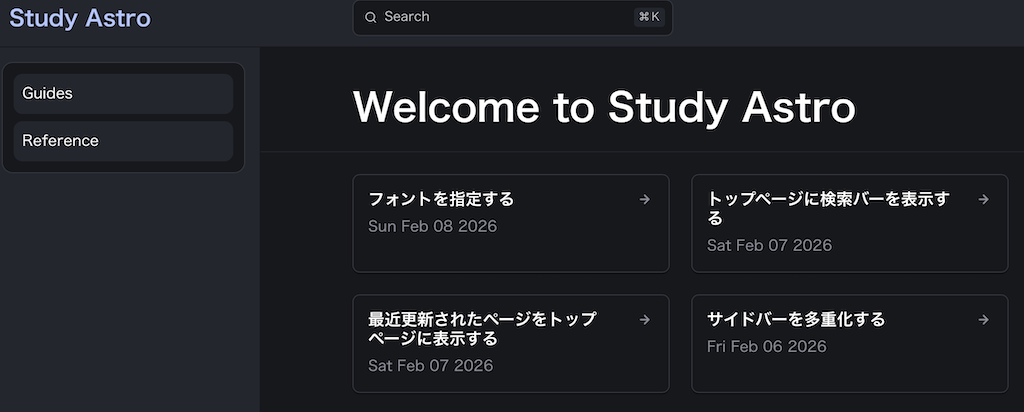
更新日時からページのリンクを表示
ページの更新日付はフロントマターの lastUpdated から取得する。この時日付は明示されている必要があって、Gitから取得する日付は取得できない。
1
2
3
4
---
title: タイトル
lastUpdated: 2026-02-06 # trueにしても取得できない
---
これを元に index.astro を作成する。以下は lastUpdated の情報を元に最新の4件を取得し、 LinkCard として表示している。
src/pages/index.astro 1:
1
2
3
4
5
6
7
8
9
10
11
12
13
14
15
16
17
18
19
20
21
22
23
24
25
26
27
28
29
30
31
---
import { getCollection } from 'astro:content';
import StarlightPage from "@astrojs/starlight/components/StarlightPage.astro";
import { CardGrid, LinkCard} from '@astrojs/starlight/components';

function getUpdatedAt(doc) {
  const date = doc.data.lastUpdated;
  if (date) {
    return date.toDateString();
  } else {
    return "";
  }
}

// /src/content/docs以下のページを取得
const docs = await getCollection("docs");
// lastUpdatedがないページをフィルタし、日付でソートして、4件取得
const updatedDocs = docs.filter(d => d.data.lastUpdated != null)
  .sort((a, b) => b.data.lastUpdated - a.data.lastUpdated).slice(0, 4);
const links = updatedDocs.map((doc) => (
  {href: `${import.meta.env.BASE_URL}/${doc.id}`, title: doc.data.title, updatedAt: getUpdatedAt(doc)}
));
---

<StarlightPage frontmatter={{ title: "Welcome to Study Astro", template: "doc" }}>
  <CardGrid>
    {links.map((link) => (
      <LinkCard title={link.title} href={link.href} description={link.updatedAt} />
    ))}
  </CardGrid>
</StarlightPage>
GitHub
実際のコードは以下にある。
シンタックスハイライトは
jsxとしたが、実際は.astroファイルである。 ↩︎
This post is licensed under CC BY 4.0 by the author.